Check Someone’s Driving Licence UK: Employer Guide (2026)
Can you check someone’s driving licence in the UK? Yes — but only with the driver’s permission. An employer cannot look up a driver’s DVLA record on their own: the driver must generate a check code and share it with you, along with the last 8 characters of their driving licence number. Enter both at gov.uk/check-driving-information and you will see the driver’s entitlements, penalty points and any disqualifications. This guide walks through the checker’s workflow step by step: what to ask for, where to enter it, what the record shows (and what it hides), and how to stay on the right side of the law.
The Short Answer: Yes — With Permission and a Check Code
You can check an employee’s (or applicant’s) driving licence through the DVLA’s free online service, but two conditions are non-negotiable:
- The driver must agree. They generate a check code themselves and hand it to you. There is no way to check someone’s licence without their active involvement.
- You need two things from the driver: the last 8 characters of their driving licence number, plus the check code they generate at gov.uk/view-driving-licence.
Enter both at the official checker page — gov.uk/check-driving-information — and the record appears instantly. The whole process costs nothing, takes a few minutes, and works for licences issued in England, Wales or Scotland.
The one thing you must never do is try to get someone’s driving licence information without their permission. It is a criminal offence to obtain another person’s personal information this way, and GOV.UK states this on the service pages themselves. Any reputable employer policy starts here: permission first, check second.
Why Employers Must Check (And the Permission Rule)
If your employees drive as part of their job — delivery drivers, sales reps, tradespeople with a van — you have a duty of care to make sure they are actually licensed to do it. An employee who lost their licence to a ban, racked up enough penalty points for disqualification, or simply never held the right entitlement could expose your business to serious liability if they are involved in an incident while driving for work.
That said, the driver’s privacy is protected by design. The DVLA built the check-code system specifically so that licence data is shared only with the driver’s consent. The driver generates the code; you cannot request one on their behalf. If a candidate refuses to provide a code, treat that as information in itself — but do not try to find another way into their record.
What to Tell the Driver to Do
The driver creates their check code at gov.uk/view-driving-licence. They will need three things:
- Their driving licence number
- Their National Insurance number
- The postcode on their driving licence
The service then gives them a check code to pass on to you. One code works for one check — if you need to check again later, they must generate a fresh one.
What You Need From the Driver
Before you start, have these two items ready from the driver:
- The last 8 characters of their driving licence number. The licence number is the long string on the front of the photocard; you only need the final 8 characters (this is what the GOV.UK checker asks for).
- Their check code. Generated at gov.uk/view-driving-licence, valid for 21 days, single use.
Practical tip: ask the driver to generate the code on the day of the check, not days in advance. Codes do not live long, and asking for a fresh one is normal — it is how the system is designed to be used. Most employers handle this by email: “Please generate your DVLA check code and send it with the last 8 digits of your licence number.”
Step-by-Step: Running the Check on GOV.UK
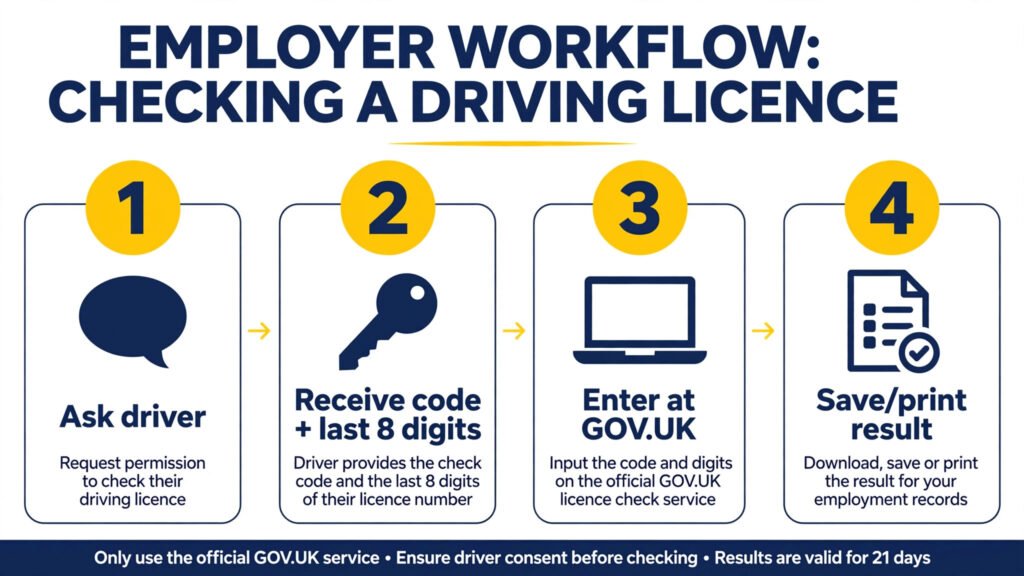
With the driver’s code and the last 8 digits in hand:
- Go to gov.uk/check-driving-information — the official DVLA “check someone’s driving licence information” page.
- Enter the last 8 characters of the driver’s licence number in the first field.
- Enter the check code the driver gave you in the second field.
- Submit. The driver’s record displays immediately.
Save or print the result as your compliance record. The page shows the licence details at the time of the check — that printout is your evidence that you checked, when you checked, and what the record said. Keep it on file with the driver’s details. If the DVLA or your insurer ever asks, this is your proof.
If the page says the code is invalid or expired, do not guess — ask the driver to generate a fresh code. Remember: each code can be used only once and stops working 21 days after it is created.
What the Record Shows (And What It Hides)
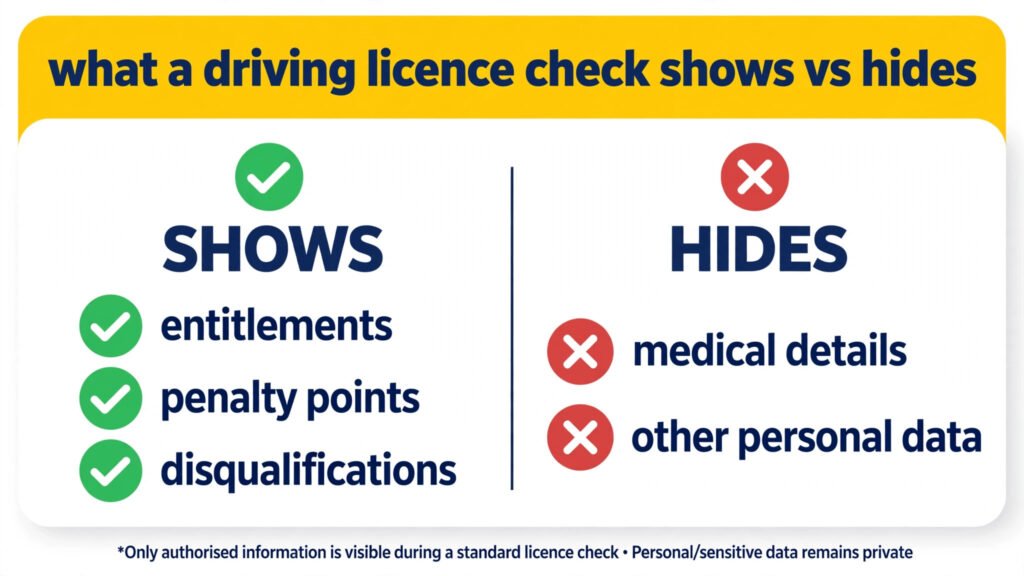
The check displays the driver’s live DVLA record. Here is exactly what you will see — and what you will not:
| What the check shows | What it does NOT show |
|---|---|
| Which vehicles they can drive (licence categories/entitlements) | Medical details or restrictions declared to the DVLA |
| Current penalty points and endorsement codes | Spent endorsements that have dropped off the record |
| Current disqualifications | The driver’s address or full licence number |
| Licence validity and issue details | Any non-motoring criminal record |
Two things matter most for employers. First, entitlements: a standard car licence (category B) does not cover every vehicle — check the categories match what you are asking them to drive. For what the DVLA itself is and how records are kept, see our guide to the DVLA driving licence. Second, live endorsements: the record shows current penalty points and disqualifications. Spent points drop off, so what you see is what counts right now.
The 21-Day, Single-Use Rule
Every check code follows two strict rules:
- Valid for 21 days. Counted from the moment the driver generates it, not from when you receive it.
- Single use. Once you have run the check, that code is spent. A second check — even minutes later — needs a brand-new code from the driver.
Ignore old guidance you may find online. Some older pages and PDFs still say check codes last 72 hours; the rule changed to 21 days back in 2015. If you are reading a page that says 72 hours, it is a decade out of date.
For drivers who generate their own codes, the full process (what they need, where to go) is covered in our driver-side guide to the driving licence check code.
How Often Should You Re-Check?
There is no statutory interval that says “re-check every X months.” What exists instead is industry best practice: annual re-checks are widely recommended as part of an employer’s duty of care, and many fleet policies require them. If a driver accumulates points or is disqualified between checks, you are the one liable for letting an unlicensed driver loose in a company vehicle.
A sensible approach for most employers:
- Check at hiring (before they drive for work).
- Re-check annually — build it into a calendar reminder, not a memory.
- Re-check immediately if you have reason to believe a driver’s circumstances changed (conviction, ban, medical issue).
Annual checks are the common baseline; higher-risk operations (HGV fleets, passenger transport) often check more frequently. Present re-checking as policy, not as law — the law requires permission for each check, and each check needs a fresh code.
Can’t Do It Online? The £5 Postal Route
When the online route is not an option — no internet access, a driver who cannot use the service, or an edge case — employers can request licence information by post:
- Complete form D888/1 together with the driver (their consent is still required).
- Send it with a £5 cheque or postal order payable as instructed on the form.
- Post to: DVLA, Drivers Fee Paying Enquiries Team, Swansea SA99 1AJ.
This is the one route that costs money — every other part of the process is free. It is slower than the online check, so use it only as the fallback. The online service is the default the DVLA wants you to use.
Stuck on the online service itself? The DVLA’s helpline for the check services is 0300 083 0013 — Monday to Friday 8am to 7pm, Saturday 8am to 2pm.
Checking Lots of Drivers (Fleet and Bulk Checks)
If you check licences regularly — a transport company with dozens of drivers, for example — generating individual check codes for every check gets tedious. The DVLA runs a service for exactly this situation: Access to Driver Data (ADD), for organisations with a legitimate business interest, subject to the driver’s consent being obtained before each check. It is aimed at businesses rather than individuals, and commercial licence-checking intermediaries also operate through it.
For most small businesses, ADD is overkill — the free check-code route is enough. If you employ a large number of drivers, contact the DVLA about business access rather than running dozens of manual checks.
Who Else Checks a Driving Licence?
Employers are not the only people who check licences. The same GOV.UK service is used any time someone needs proof of what a driver is allowed to drive and whether they have points or a ban:
- Car hire companies check your licence at the desk or before collection, usually with a check code you generate for them.
- Insurers may ask to see a licence record when you take out or renew a policy, so the points on it match what you declared.
- Anyone lending a car — if you let a friend or family member drive your car, checking their licence first confirms they hold the right category and are not banned. They will need their own insurance to drive it.
- Driving instructors and agencies check trainee and supply drivers before putting them on the road.
Whoever is checking, the rule never changes: the driver must generate the check code and give permission. There is no official way to look up a stranger’s licence record in secret — anyone offering that is not using the DVLA service.
Conclusion
Checking someone’s driving licence in the UK is straightforward but strictly permission-based: the driver generates a check code, hands it to you with the last 8 digits of their licence number, and you enter both at gov.uk/check-driving-information. The code lasts 21 days and works exactly once. The record shows entitlements, live penalty points and disqualifications — nothing more, nothing less. Save the result as your compliance record, re-check annually as best practice, and never attempt to access a record without the driver’s consent — that is a criminal offence. If the online route fails, the £5 postal fallback (form D888/1) still gets you there.
One Comment